Introduction
In addition to supply data, the USB interface provides a convenient outlet (see what I did there) to supply power to low-power peripherals. Table 1 provides a summary of the USB 2.0 Specification.
If these parameters constrain your system such as 5V supply and 2.25W of power delivery, then it is mandatory to use DC-DC converters to supply the desired voltage rails or a wall adapter for higher power-delivery. This additional circuitry is usually present in electronic systems.
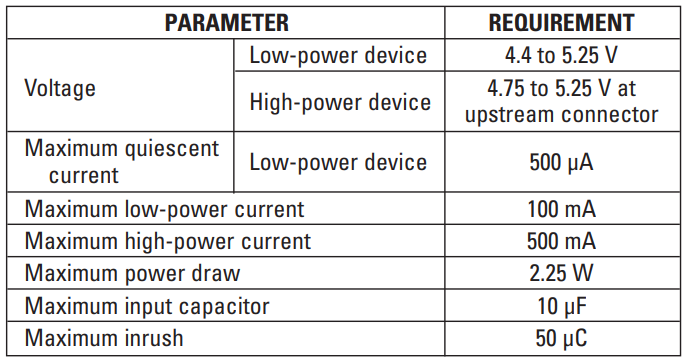
Another unique requirement of USB is the different current draws allowed. This process is handled by a process called Enumeration, where the host and peripheral device agree on the current draw.
NOTE: USB1.0 devices are still present but can cause issues when connecting to a USB Hub. Please exercise caution
When using USB products, two configurations are possible:
- A peripheral connected to a host
- A range of peripherals that connect to a host via a hub
In either configuration, current-limiting is required for protection since unknown peripherals connected to the USB hub could draw excessive current and potentially cause damage.
For the first configuration, adding an input capacitor is enough to handle current limiting.
In the second configuration, however, extra protection circuitry is needed such as power ICs with external/internal switches (TPS2140IPWPR) or voltage supervisors.
Bucking the USB Rail
I mentioned in the beginning that designers, convert the supply from the USB port to different rails to meet their system requirements. This can be done in the following ways:
- Buck regulators (synchronous and non-synchronous)
- Linear regulators
- Charge pumps
NOTE: For each option there is a trade-off with efficiency, size and cost. This is left to the discretion of the designer
The linear regulator is the most cost-effective solution, however it consumes the most power.
For a more efficient solution, Figure 1 shows the use of the TL5001D which bucks the 5V USB supply to 3.3V, which can power other parts of the system.
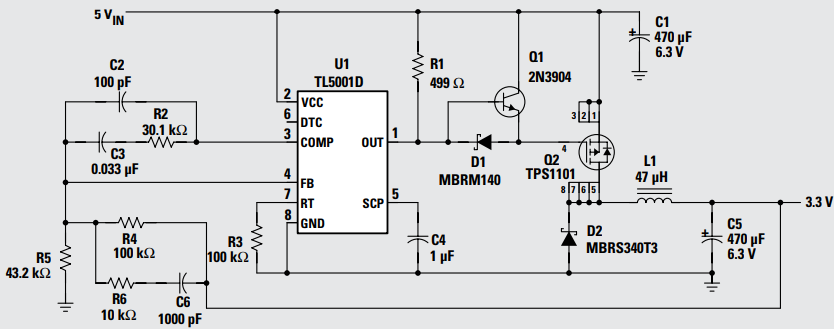
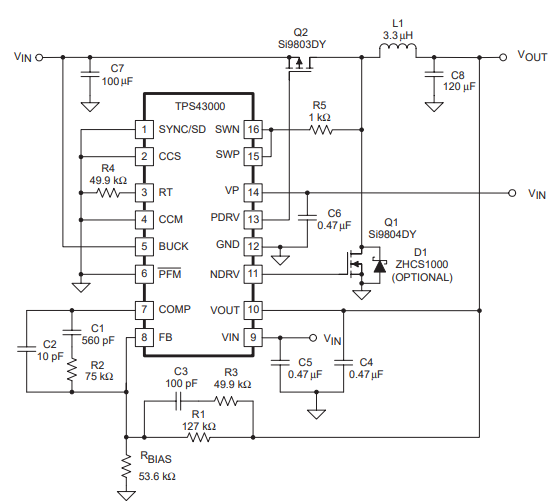
Q2 is an external FET which bucks the input voltage, with D2 functioning as a freewheeling diode. For a more efficient solution (and smaller board size), a synchronous converter (TPS43000) can be used at the cost of … higher cost. This offers a higher level of integration which is immensely desirable.
For the lowest component count (and thus smaller board area), a charge pump can used such as the TPS60501DGS.
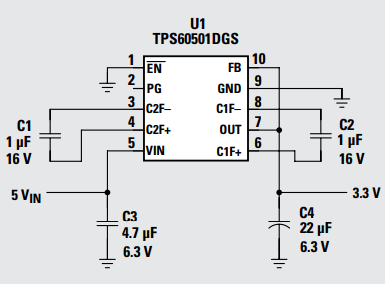
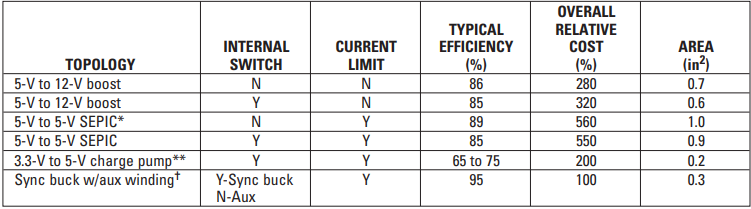
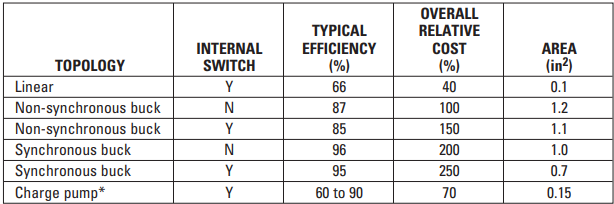
Table 2 below summarizes the different solutions provided for bucking 5V USB to 3.3V.
Boosting the USB Rail
A system may require the USB voltage to be boosted to power analog electronics. In such instances the following devices can be used:
- Boost converters
- SEPIC’s
- Charge pumps
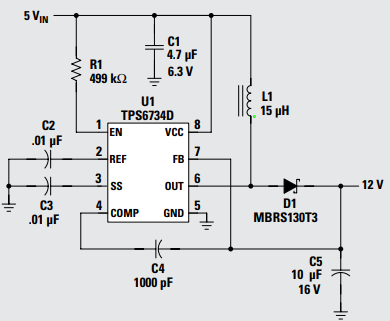
Figure 4 implements the TPS6734ID to boost the 5V input to 12V @120mA. This circuit includes an integrated FET however there is no current-limiting protection.
An alternative solution is using a SEPIC. This allows the output voltage to be transformed below or above the input voltage. This is beneficial as USB can range from 4.5V – 5.5V. The following is an example circuit using the UCC39421PW.
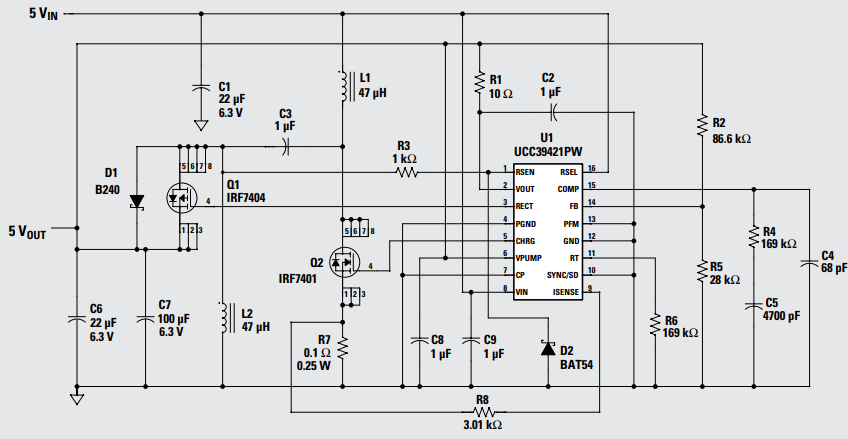
Q1 performs synchronous rectification. Other benefits include current-limiting and low input ripple current.
Often, a 5V and 3.3V rail is required. In such instances, the TPS62000DGS can perform both functions using an output winding.
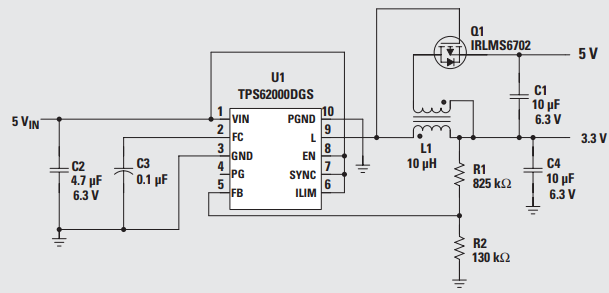
To assist designers in making the best decision to suit their application, the table below clearly conveys the pros and cons of each solution.