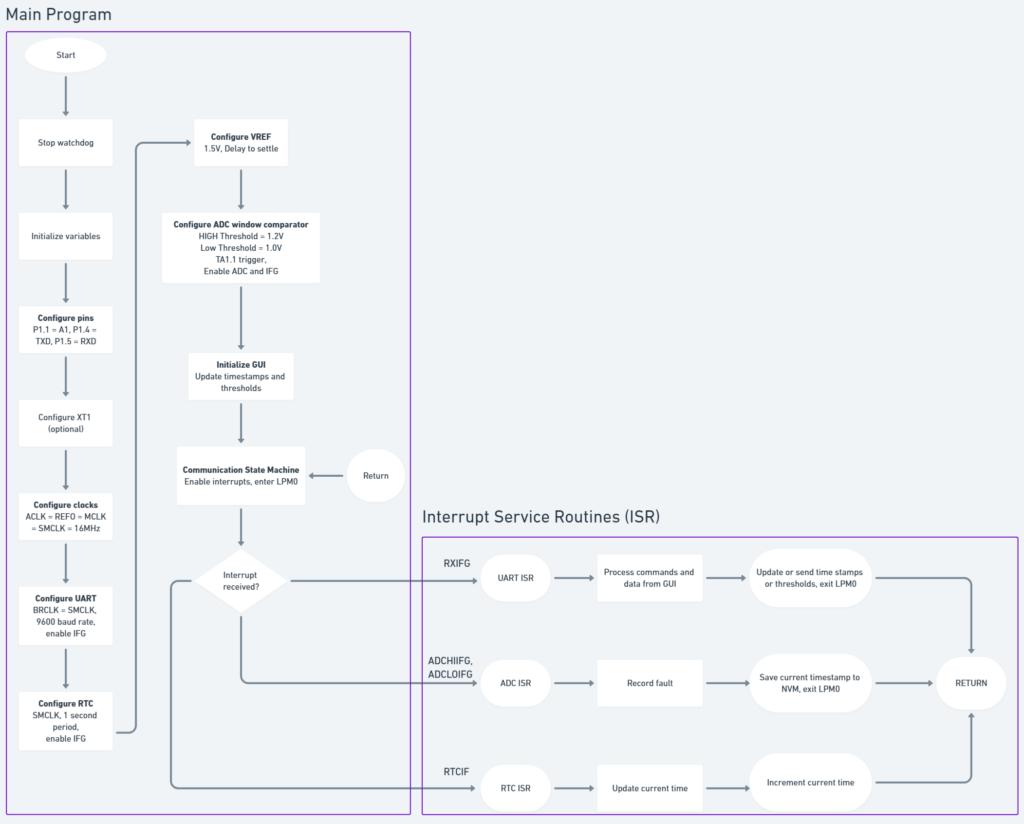
The project uses the internal ADC to monitor the supply voltage and to record the timestamp when the supply voltage exceeds a low or high threshold. The project maybe can be to set different triggering thresholds.
Motivation
In battery or bus-powered applications it is desirable to save the system state during a power cycling event. The real time can be recorded as a timestamp to track the power loss event.
The MSP430 can be used as an affordable solution to this issue. This project will utilize it’s internal ADC, window comparator, RTC counter and FRAM.
Background
The MSP430 will be used to detect and record when a power failure (under/overvoltage) has occurred
ADC
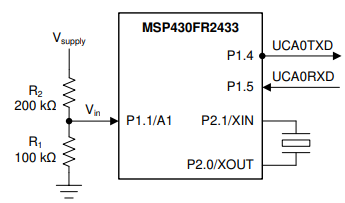
The ADC window comparator is used to monitor the supply voltage.
The supply voltage is connected to a voltage divider which connect to the internal ADC window comparator. If Vsupply = 3.3V, then Vin is 1.1V. That is, that the supply voltage is divided by a 1/3.
NOTE: Voltages much higher than the MCU voltage can be measured using a voltage divider. This is a big plus!
The internal 1.5V reference for the ADC is used although an external reference can be used to suit your application.
The low and high voltage trigger thresholds are defined by two macros in the program. ADC_THR_HIGH_INIT and ADC_THR_LOW_INIT. They are calculated using the equations below:
\begin{aligned}
V_{th,\text{high}} &= V_{\text{REF}} \cdot \frac{\text{ADC\_THR\_HIGH\_INIT}}{1023}
= 1.5\,\text{V} \cdot \frac{818}{1023} = 1.2\,\text{V} \\[1.2em]
V_{th,\text{low}}  &= V_{\text{REF}} \cdot \frac{\text{ADC\_THR\_LOW\_INIT}}{1023}
= 1.5\,\text{V} \cdot \frac{682}{1023} = 1\,\text{V}
\end{aligned}
If Vin drops below 1V or increases above 1.2V, an ADC window comparator interrupt is generated. In the interrupt service routine (ISR), the current timestamp is read and stored in FRAM.
Changing the low and high triggering thresholds or the ratio of the voltage divider will adjust the triggering thresholds.
NOTE: Large resistances are recommended to minimize power losses with the voltage divider
RTC
RTC module keeps track of time. The internal 32.768kHz oscillator is used as CLK source. The readings are … read via UART. See the schematic above
The real time is updated once per second. By sending the RTC_READ_TIME command, the current real time can be requested. If it needs to be updated, RTC_WRITE_TIME can be sent.
The timestamps for a low and high voltage timestamp can be read using RTC_READ_THR_HIGH and RTC_READ_THR_LOW.
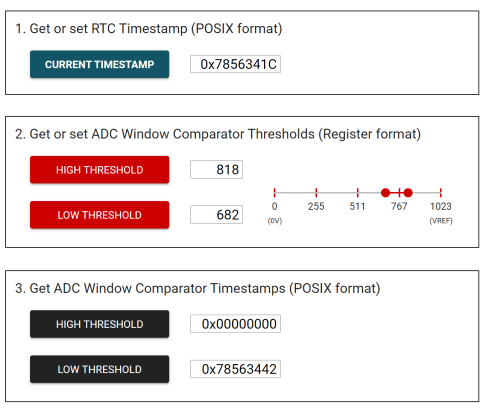
GUI
The threshold can be set for when the window comparator gets tripped. The timestamp is recorded in the non-volatile memory (NVM) (RAM).
The GUI has 3 sections
- Setting the current time
- Adjusting the low and high thresholds for the ADC window comparator
- Viewing the latest timestamps and the POSIX format
The RTC current time can be read by clicking Current Timestamp.
The high and low voltage thresholds can be adjusted between 0 – 1023.
The MSP430 uses a 10-bit ADC which gives 2^10 = 1024 bits of resolution