
Here’s the flowchart from the previous nibble, we let off from Step 4.
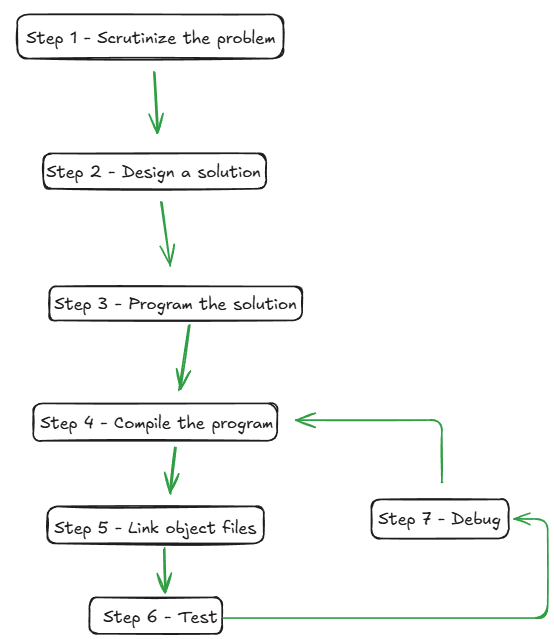
This Nibble continues from compilation and follows the program through linking, building, testing, and debugging.
Three things to take away:
- Compilation checks and translates individual source files.
- Linking combines object files and libraries into an executable.
- Testing and debugging form an iterative loop: run, observe, fix, repeat.
Step 4 – Compile the program
The compiler performs two functions (get it functions):
- Verifies that your source code conforms to the rules of the C++ language. This is referred to as the syntax.
- Converts C++ code into machine language instructions. The generation is an an object file. Object files have the
.o, .objfile extension. Each file in your program generate a unique object file.
If the compiler rejects your code, it’s not because it dislikes you. Coding, compiling, reading errors, fixing errors is part of the workflow.
The compiler generates the object files, however a file may contain a function defined in another file.
For example, main.cpp might call a function declared in a header:
// combat.h
#ifndef COMBAT_H
#define COMBAT_H

int calculateDamage(int attack, int defence);

#endif
// main.cpp
#include <iostream>
#include "combat.h"
int main(){
std::cout << calculateDamage(10, 3) << '\\n';
return 0;
}The compiler can compile main.cpp because it has seen the declaration of calculateDamage().
The next step is to combine (or link) these files together.
Step 5 – Link object files
After compilation we have a collection of separate files floating around.
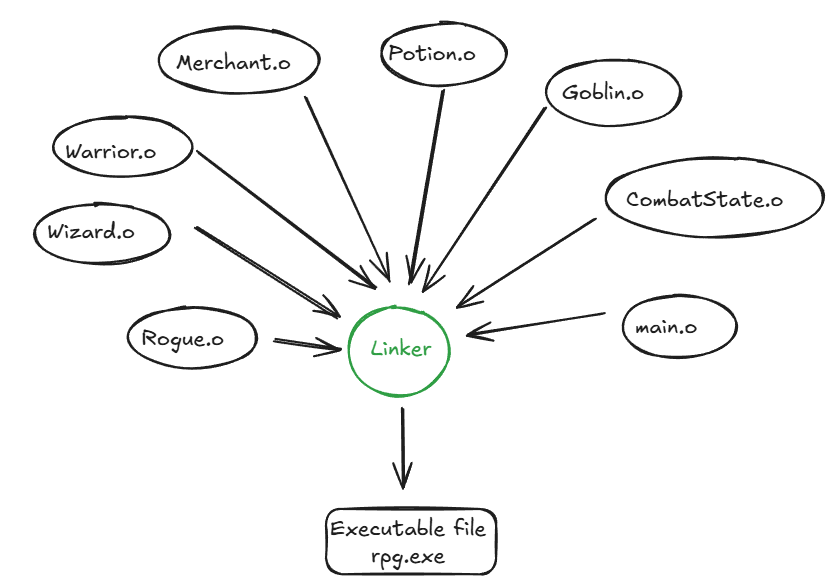
The linker combines all of the separate object files
NOTE: An object file is created for each .cpp file.
The role of the linker is to (link) combines all of the object files into a final executable program.
Additionally, it links in library files and resolves cross-dependencies.
An example for an RPG game is shown below
NOTE: The process of converting the source files into an .exe is called building. The result of a build process is called a … build.
For larger projects, building manually becomes tedious. A serious project may contain dozens, hundreds, or thousands of source files.
That is why build tools exist.
Common build tools include:
make- CMake
- Ninja
- MSBuild
- Premake
These tools automate the build process. They track which files need to be compiled, which libraries must be linked, and how the final executable should be produced.
The compiler translates. The linker combines. The build system coordinates the whole process.
Usually our programs don’t correctly work the first time. Thus, we perform an iterative loop of testing and debugging.
Steps 6 – Testing
Testing is validating that our program does what it should.
For example, if we wrote this function:
int calculateDamage(int attack, int defence){
    return attack - defence;
}
we might test it with simple cases:
attack = 10, defence = 3  → expected result: 7
attack = 5,  defence = 5  → expected result: 0
attack = 3,  defence = 8  → expected result: should this be negative?
That last case is important. Testing does not only confirm the obvious cases. It also exposes design questions.
Should damage be allowed to go below zero?
If not, the function needs to change:
#include <algorithm>

int calculateDamage(int attack, int defence){
    return std::max(0, attack - defence);
}
Testing forces the program to confront real inputs instead of ideal ones.
Step 7: Debug the program
Debugging is the process of finding and fixing bugs.
A bug can appear in many forms:
- The program crashes.
- The output is wrong.
- The program accepts invalid input.
- The program rejects valid input.
- The program works for one case but fails for another.
- The program behaves differently after a small change.
Debugging usually follows a cycle:
Run the program
        ↓
Observe the behaviour
        ↓
Find the cause
        ↓
Change the code
        ↓
Rebuild and retest
This is why programming is iterative. You rarely write a complete program perfectly in one pass.
The correct expectation is:
Build, test, debug, repeat.
Testing and debugging are different
Testing and debugging are related, but they are not the same thing.
| Activity | Purpose |
|---|---|
| Testing | Discover whether the program behaves correctly |
| Debugging | Find and fix the cause when it does not |
Testing reveals the symptom. Debugging investigates the cause.
For example:
Test result: damage calculation returned -5.
Debugging question: why did the function allow negative damage?
The test tells us something is wrong. Debugging explains why.
In Conclusion
A C++ program does not jump directly from source code to execution, rather it undergoes a process.
Each source file is compiled into an object file. The linker combines those object files, resolves cross-file references, and produces the executable. The full process is called building.
After that, the real work continues: test the program, debug the failures, improve the design, and repeat