Background
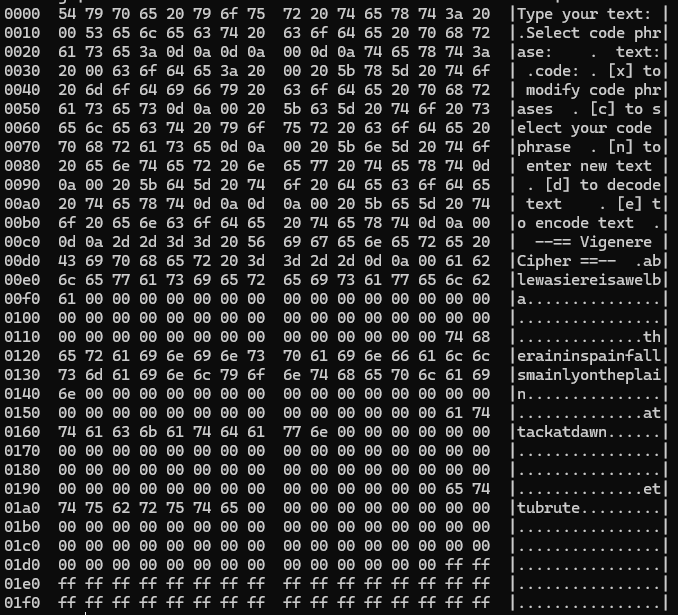
EEPROM will be used to store code phrases and the menu UI. Thus, this project serves as a great excuse to use EEPROM.
The Theory
To use flash memory for AVR MCU’s, we must import <avr/pgmspace.h> then use specific API’s to read and write to flash. Well, it’s a very similar procedure when working with EEPROM.
Using EEPROM
The internal EEPROM is slow to erase or write to. An erase operation takes 3.4ms, a write operation takes 1.8ms. It has a limited lifespan of 100,000 writes.
The API’s related to EEPROM usage is located in avr/eeprom.h. I’ll use this to make our life easier, more specifically I’ll use:
eeprom_update_byte()eeprom_update_word()eeprom_update_block()eeprom_read_byte()eeprom_read_word()eeprom_read_block()
To read from EEPROM, we simply pass in the address as an argument and the function will return the data
Avrdude and EEPROM
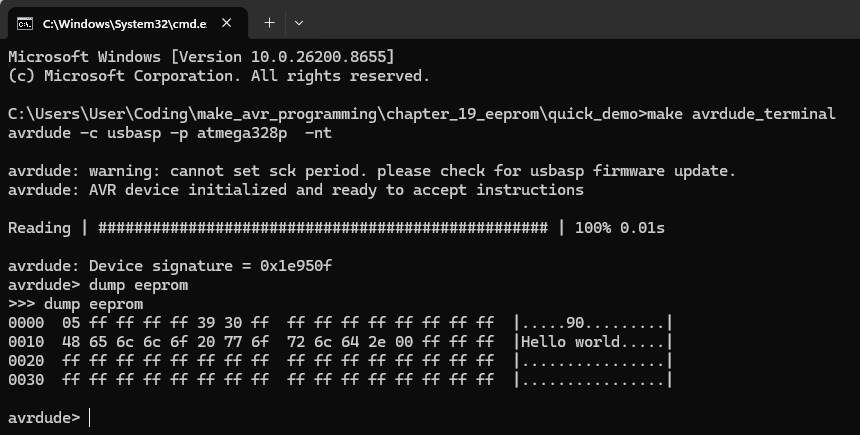
We can dump the contents of EEPROM using:
make avrdude_terminal
dump eeprom
Organizing data in EEPROM
When we store variables in RAM, we don’t have to keep track of variable addresses (thank goodness), the compiler does this automatically for us.
To make our life easier we can use C’s built-in variable handling and pointer addressing scheme to simplify EEPROM memory management. This is demonstrated in the example below. It uses the EEMEM macro to create two EEMEM variables.
char eeprom_string[STRING_LEN] EEMEM = "Welcome to the EEMEM demo. \r\n";
uint16_t eeprom_word EEMEM = 12345;
Initializing EEPROM
So far, we’ve been doing make flash to flash our projects. If we change the EEMEM variables in our program and want to update the EEPROM, we must run another command → make flash_eeprom.
Hardware Connections
Only PC, USB-Serial converter and AVR MCU required.
The Software
Program consists of a .c and .h file. Full source code available at the GitHub repository.
The Showcase
Basically, you enter a text string and a code phrase. You can then apply the encryption or the decryption algorithm.
Their are 5 possible options in the menu UI. The first 3 relates to configuration, the last 2 is program functionality.
- Enter text
- Select code phrase
- Modify code phrase
- Encode text
- Decode text